
Short answer: Tinu Time is available on the App Store from today, for iPhone and iPad. The app takes children aged about 5 to 10 through nine steps, from a first look at the clock face to working out durations. Every explanation is read aloud, in English, German, French, Spanish, Chinese and Polish. Tinu Time has no ads, no subscription and no in-app purchases, needs no internet connection and keeps everything on the device.
Since March we have written here about what matters to us when children learn to tell the time: why telling the time is so hard, when children can tell the time, why analogue comes before digital, why half past needs its own explanation and why hours are blue and minutes orange. Today Tinu Time has been released. Here we describe, plainly, what the app does and what it doesn’t.
What does Tinu Time teach?
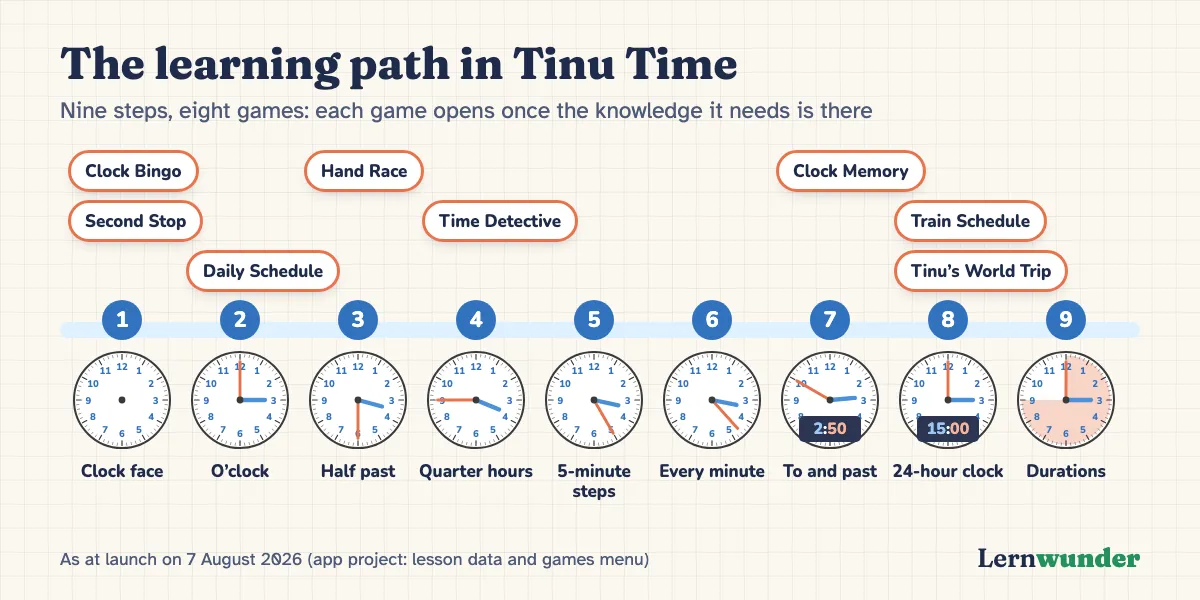
The analogue clock, step by step. Each step builds on the one before:
| Step | Content |
|---|---|
| 1 | The clock face: numbers, hands, clockwise, counting in fives |
| 2 | O’clock |
| 3 | Half past |
| 4 | Quarter past and quarter to |
| 5 | Five-minute steps |
| 6 | Every single minute |
| 7 | To and past, linked to the digital clock |
| 8 | The 24-hour clock |
| 9 | Durations: how long does it take? |
The order of the first steps follows what developmental studies describe: first o’clock, then half past, then five-minute steps, finally single minutes (as summarised by Burny et al., 2013).
How does a lesson work?
Tinu, a friendly golden alarm clock, does the explaining. Each lesson has up to three parts. First Tinu shows and explains a time, and exactly the parts of the clock being talked about light up. Then the child picks the right clock from several. Finally the child sets the time, turning the hands with a finger. The hour hand moves along with the minute hand, just like on a real clock.
Everything Tinu says is narrated, so a child who cannot read yet can find their way alone. A meta-analysis of 43 effects found that spoken explanations alongside a picture often work better than written ones (Ginns, 2005). To be fair, the advantage was clearest when the pace was set by the system. In Tinu Time the child sets the pace and can hear any sentence again.
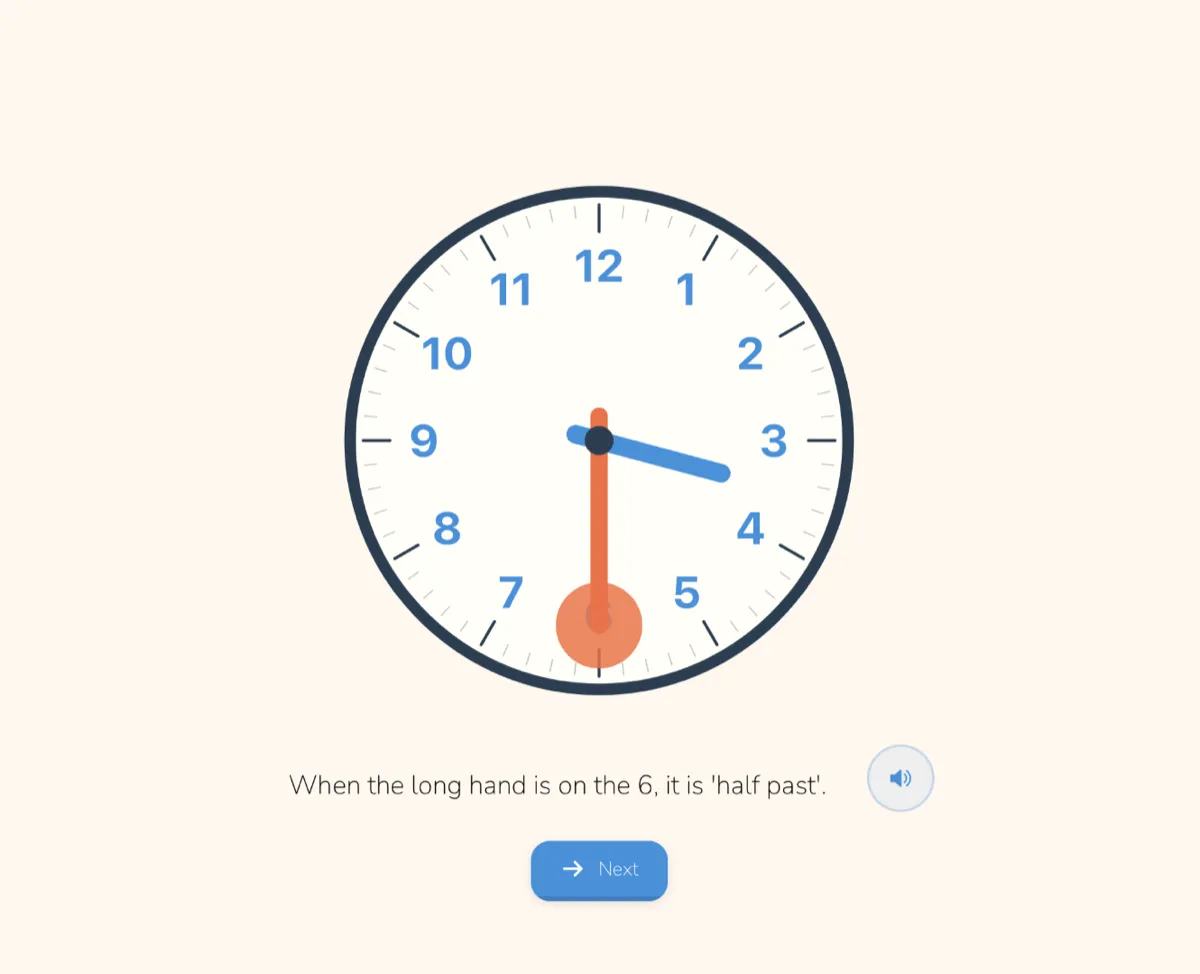
Help only when asked for. Many steps have a help button that, for example, shades half of the clock or adds a minute ring around the face. It stays off until the child presses it.
Mistakes that explain something. When a child sets a wrong time, the app checks which typical mistake lies behind it: hands mixed up, not counting in fives, “to” and “past” confused. Tinu then gives a matching hint, often with a small clock showing the right time. These are among the most common clock-reading errors (Burny et al., 2012).
Half past and regional forms
In German, “halb vier” means 3:30, which trips up many children. So in the German version there is a short, fully narrated unit before the half hours begin. In English, half past is explained in the normal lessons.
Families can also choose whether lesson tasks say “quarter past” or “quarter after” in English, and “Viertel nach drei” or “Viertel vier” in German.
How does the app know where a child stands?
- Placement test. Children who already know some times don’t have to start from zero. A short test climbs step by step with three tasks each; getting two right moves the child up a step. The child then starts at the right level.
- Mastery test. At the end of the steps there is a test with varying times and stars. Getting 80 per cent right opens the next step. Children who don’t make it yet keep practising and try again.
- Daily challenge. The app keeps the times a child finds hard in a spaced-repetition card box and brings them back in the daily challenge.
Games, stickers, clock designs
Eight learning games unlock once the necessary knowledge is there: for example Clock Bingo from the start, Daily Schedule from o’clock, Time Detective (reading clocks in pictures) from quarter hours, and Train Schedule and Tinu’s World Trip from the 24-hour clock. Every game explains itself with narration.

There are also 15 clock stickers, from the sundial to the atomic clock, and clock designs that open after completed steps. These designs have hands in other colours. Why we chose this deliberately and why the classic blue and orange always stays available is explained in our article on hand colours.
What do parents see?
A parents’ area, protected by a sum, shows progress in every step and the times your child is still struggling with, plus a tip for everyday life. There you can also reset everything when another child wants to start.
What Tinu Time deliberately doesn’t do
- No ads, no subscription, no in-app purchases, no tracking. Tinu Time is a one-off purchase. In a study of 135 popular apps for children up to five, 95% contained some form of advertising, and apps labelled “educational” were affected about as often (Meyer et al., 2019).
- No account, no internet. The app makes no network connections. All progress stays on the device.
- No time pressure while learning. Lessons and tests have no running clock. Only the game Hand Race is a race against time.
- No replacement for a real clock. A clock in the kitchen, a homemade learning clock and talking about it remain important. The app does not replace assessment or specialist support.
Who is Tinu Time for?
Children aged about 5 to 10: from the preschooler discovering o’clock for the first time to the primary school child working with timetables and durations. Because everything is read aloud, the app also suits children who cannot read yet, and multilingual families.
Good learning apps support active, engaged, meaningful and socially interactive learning with a clear goal (Hirsh-Pasek et al., 2015). The social part is hard for an app. It is worth sitting alongside now and then.
What you can do
- Start together. Do the placement test with your child and see where they begin.
- Ask in everyday life. Find on the kitchen clock what was practised in the app: “Which step are you on? Show me a time like that.”
- Short and regular. The daily challenge is short. A few minutes on several days help more than one long session.
- Look into the parents’ area now and then. The times that are still hard make good topics for everyday life.
Frequently asked questions
Is Tinu Time available for Android? At launch, Tinu Time is available on the App Store for iPhone and iPad.
Does my child need an account or internet? No. Tinu Time works without an account and completely offline.
Can my child start before school? Yes, with the first steps. Because everything is read aloud, they don’t need to read. For the later steps they need to be able to count in fives.
Which languages are available? English, German, French, Spanish, Chinese and Polish, each with interface and narration.
More about the app on the Tinu Time page.
Sources
- Burny, E., Valcke, M. & Desoete, A. (2012). Clock reading: An underestimated topic in children with mathematics difficulties. Journal of Learning Disabilities, 45(4), 351–360. https://doi.org/10.1177/0022219411407773
- Burny, E., Valcke, M., Desoete, A. & Van Luit, J. E. H. (2013). Curriculum sequencing and the acquisition of clock-reading skills among Chinese and Flemish children. International Journal of Science and Mathematics Education, 11(3), 761–785. https://doi.org/10.1007/s10763-012-9362-z
- Ginns, P. (2005). Meta-analysis of the modality effect. Learning and Instruction, 15(4), 313–331. https://doi.org/10.1016/j.learninstruc.2005.07.001
- Hirsh-Pasek, K., Zosh, J. M., Golinkoff, R. M., Gray, J. H., Robb, M. B. & Kaufman, J. (2015). Putting education in “educational” apps: Lessons from the science of learning. Psychological Science in the Public Interest, 16(1), 3–34. https://doi.org/10.1177/1529100615569721
- Meyer, M., Adkins, V., Yuan, N., Weeks, H. M., Chang, Y.-J. & Radesky, J. (2019). Advertising in young children’s apps: A content analysis. Journal of Developmental & Behavioral Pediatrics, 40(1), 32–39. https://doi.org/10.1097/DBP.0000000000000622
Lernwunder editorial team · Chaolan Lu