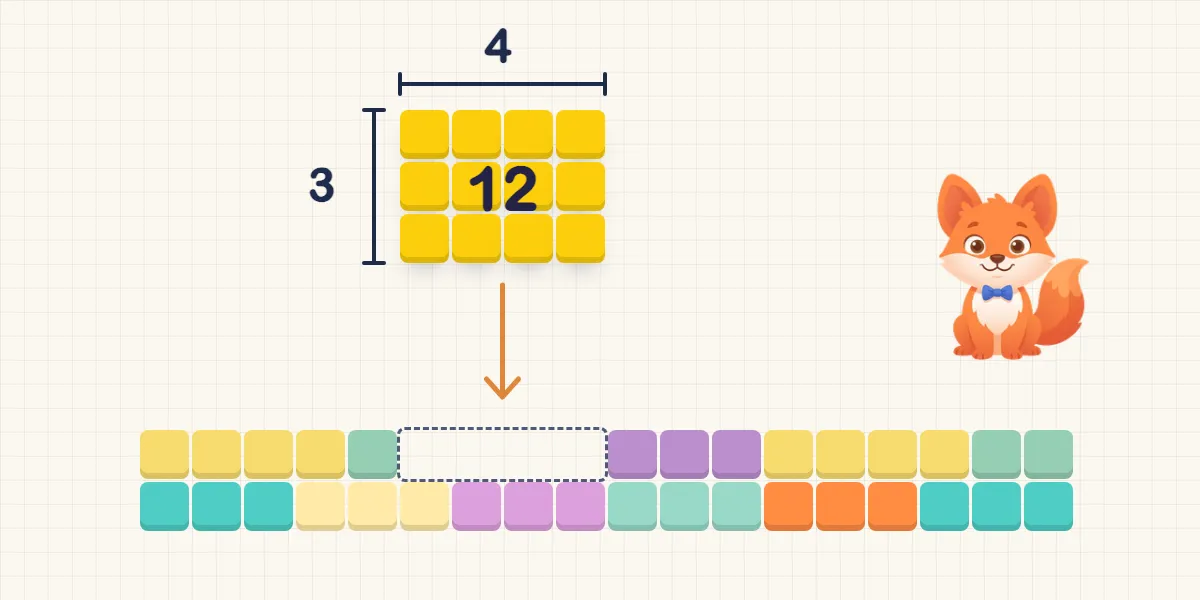
In short: Droptiply is available on the App Store from today, for iPhone and iPad. The app practises the times tables up to 10 × 10 with children aged about 6 to 12: every fact is a block whose height and width are the two factors, and whoever answers the fact gets to place the block on the board. Droptiply has no ads, no subscription and no in-app purchases, collects no data and is available in nine languages.
Since December we’ve written here about what matters to us with times tables: understanding first, then knowing by heart, deriving facts from anchor facts, and seeing multiplication as a rectangle. We’ve also described how this became a game with falling blocks and how we want to show progress without pressure. Today Droptiply is out. Here is a plain account of what the app does and what it doesn’t.
What does Droptiply practise?
All 100 multiplication facts from 1 × 1 to 10 × 10. The aim is for children to recall the answers reliably and to know what a multiplication actually means.
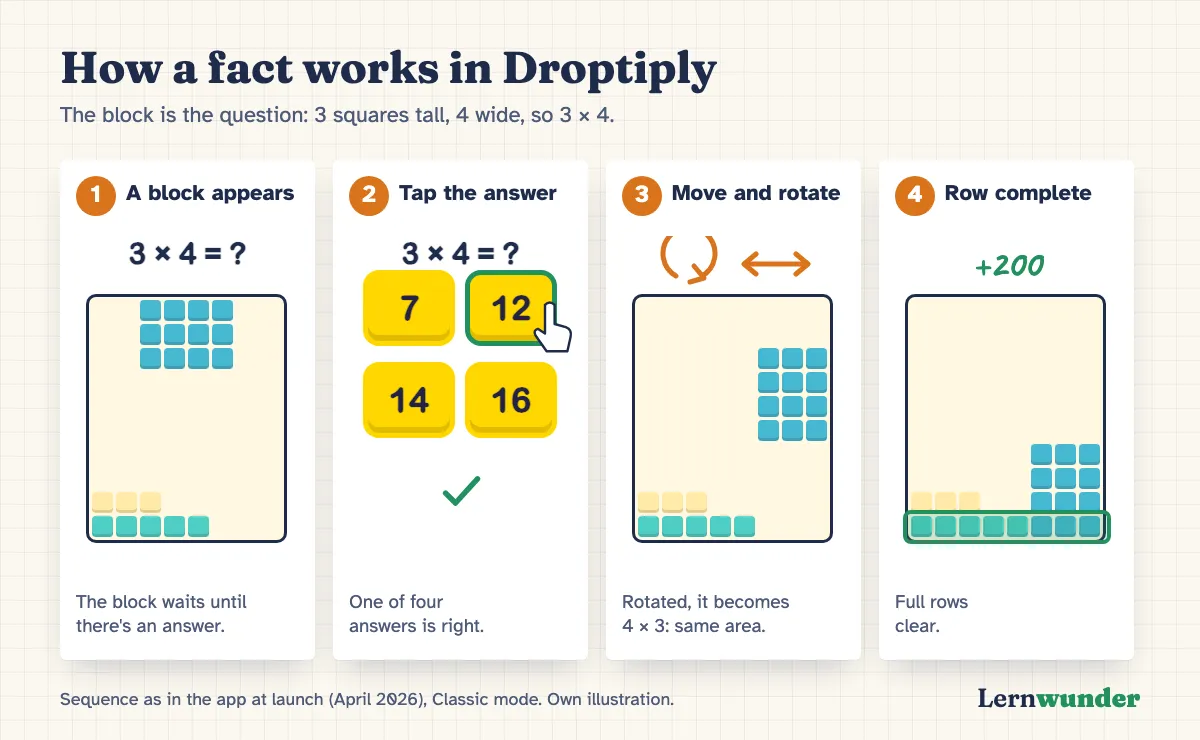
That’s why every fact is a rectangle. A block that is 3 squares tall and 4 squares wide stands for 3 × 4 and covers exactly 12 squares. If the child rotates the block, it becomes 4 × 3: the same 12 squares, turned on its side. The turnaround fact becomes visible. A study with primary school children showed that this array model can support understanding and reasoning, but also comes with its own stumbling blocks (Barmby et al., 2009).
How does a round work?
A block appears at the top with its fact, and four answers below it. Only when the child taps the right one is the block released: they can move and rotate it, then it drops onto the board. Full rows clear and score points. When no new block fits, the round ends.
The three wrong answers aren’t random. They come, for example, from a neighbouring fact, from mixing up times and plus (3 + 4 instead of 3 × 4), or sit just next to the answer. In the early worlds they’re easier to tell apart; later they get closer together.
After a mistake the child can try again. After the second wrong attempt the correct answer pulses gently; after the third it is shown and the block is released. So nobody gets stuck on a fact, and the fact comes back later.
Which fact comes next?
In the background Droptiply keeps track of how secure each of the 100 facts is: every answer that’s right on the first try earns a star, up to five. Facts with few stars come up more often, well-known ones less often, and anything that hasn’t come up for a few days moves back up the queue. Solving 3 × 4 also counts for 4 × 3. The home screen shows up to five facts under “Facts to review”. We’ll explain how this works in detail, and the research behind it, in a separate post.
Worlds, modes, buddies
Eight worlds. The times tables are split into eight worlds that add new tables step by step: 1 and 10 first, then 5, 2 and 4, 3, 6 and 9, 7, and finally 8. The next world opens once 95 percent of a world’s facts are secure. A child who already knows a table well can also skip a world in the early stages.
Four game modes. Classic: the block waits for the answer and only falls afterwards. Zen: nothing falls on its own; the child places blocks at their own pace. Speed: five seconds per answer, with a bonus for fast answers. No Mistakes: three lives, each mistake costs one. The child, or you, decides which mode fits.
Eight buddies, ten themes. Children choose one of eight characters, each with a small gameplay perk, such as earlier hints. Each character keeps its own learning progress. New colour themes with their own music open up with the worlds; the last one only once all 100 facts are well learned. There are also achievements, which can be hidden in the settings.
Progress for grown-ups. An overview shows all 100 facts as a 10 × 10 grid, shaded in four levels from “Not mastered” to “Perfected”. You can see at a glance where things are still shaky.
Accessibility
In the settings you can switch on patterns for colour-blind children, high contrast and reduced motion, as well as the OpenDyslexic font. On the latter we want to be honest: a study with children with dyslexia found no faster or more accurate reading with this font (Wery & Diliberto, 2017). We offer it as a choice, without promising a learning effect. Sound effects, music and vibration can each be switched off.
What Droptiply deliberately doesn’t do
- No ads, no subscription, no in-app purchases. Droptiply is a paid app. In a study of 135 popular apps for children aged five and under, 95% contained some form of advertising, and apps labelled “educational” were hardly less affected (Meyer et al., 2019).
- No data collection, no account, no internet required. All progress stays on the device.
- No forced speed. Only Speed mode has a timer, and children choose it themselves.
- No replacement for understanding and conversation. Building rectangles, drawing arrays and talking about strategies still matter. The app takes over the regular practice afterwards. It is not a substitute for a learning assessment or specialist support for maths difficulties.
Who is Droptiply for?
For children aged about 6 to 12: from the point when times tables are introduced at school to older children who are still unsure. In Germany’s national education standards, children are expected to know the times tables by heart by the end of primary school (KMK, 2022). Droptiply covers the facts up to 10 × 10.
The app is available in nine languages: English, German, Spanish, French, Italian, Dutch, Polish, Portuguese and Chinese (Simplified).
Good learning apps support learning that is active, engaged, meaningful and socially interactive, with a clear learning goal (Hirsh-Pasek et al., 2015). An app can hardly provide the social part. It’s worth sitting next to your child now and then.
What you can do
- Ask about the block. “Why does the 3-by-4 block fit here?” or “How many squares does it have?” links the game to the rectangle.
- Rectangles on squared paper. Draw 6 × 7 together and split it into 5 × 7 and 1 × 7. That’s the same idea as in the app.
- Hunt for turnaround facts. When your child says 4 × 8, ask for the fact that covers the same area.
- Short and often. A few minutes on several days helps more than one long session at the weekend.
Frequently asked questions
Does my child need an account or internet access? No. Droptiply works without an account and without an internet connection. All data stays on the device.
Can siblings practise on one device? Yes. Each of the eight buddy characters has its own progress. If each child picks their own character, they practise with their own progress.
Is Droptiply available for Android? At launch, Droptiply is available on the App Store for iPhone and iPad.
Can progress be reset? Yes, in the settings, separately for each character.
Find out more on the Droptiply page.
Sources
- Barmby, P., Harries, T., Higgins, S. & Suggate, J. (2009). The array representation and primary children’s understanding and reasoning in multiplication. Educational Studies in Mathematics, 70(3), 217–241. https://doi.org/10.1007/s10649-008-9145-1
- Hirsh-Pasek, K., Zosh, J. M., Golinkoff, R. M., Gray, J. H., Robb, M. B. & Kaufman, J. (2015). Putting education in “educational” apps: Lessons from the science of learning. Psychological Science in the Public Interest, 16(1), 3–34. https://doi.org/10.1177/1529100615569721
- Kultusministerkonferenz (2022). Bildungsstandards für das Fach Mathematik. Primarbereich (Beschluss vom 15.10.2004, i. d. F. vom 23.06.2022). https://www.kmk.org/fileadmin/Dateien/veroeffentlichungen_beschluesse/2022/2022_06_23-Bista-Primarbereich-Mathe.pdf
- Meyer, M., Adkins, V., Yuan, N., Weeks, H. M., Chang, Y.-J. & Radesky, J. (2019). Advertising in young children’s apps: A content analysis. Journal of Developmental & Behavioral Pediatrics, 40(1), 32–39. https://doi.org/10.1097/DBP.0000000000000622
- Wery, J. J. & Diliberto, J. A. (2017). The effect of a specialized dyslexia font, OpenDyslexic, on reading rate and accuracy. Annals of Dyslexia, 67(2), 114–127. https://doi.org/10.1007/s11881-016-0127-1
Lernwunder editorial team · Chaolan Lu